GPU Virtual Machines for AI: Architecture, Tradeoffs, and Performance Design
Deep dive into GPU-backed VM architecture for AI and ML workloads, including passthrough, vGPU, SR-IOV, MIG, NUMA locality, PCIe topology, and operational design.
GPU-backed virtual machines have gone from niche to mainstream because AI workloads need isolation, reproducibility, and policy control almost as much as they need raw accelerator throughput. The challenge is that GPUs expose every weak assumption in a virtualization stack: NUMA topology, PCIe layout, IOMMU behavior, storage staging, and network locality all suddenly matter.
This article looks at GPU-backed VM design as an architecture problem rather than a single feature checkbox.
Why Run AI on VMs at All?
At first glance, containers on bare metal seem simpler for AI workloads. In practice, VMs remain valuable because they provide:
- hard isolation boundaries between teams or tenants
- more predictable policy enforcement
- reproducible machine images and driver stacks
- separation between platform and workload lifecycle
- better fit for regulated or multi-tenant environments
This is especially relevant for organizations building shared AI infrastructure internally, where platform teams need to offer GPU access without letting every project own bare-metal hosts.
The Four Main GPU Virtualization Models
Different GPU attachment models produce very different operational behavior.
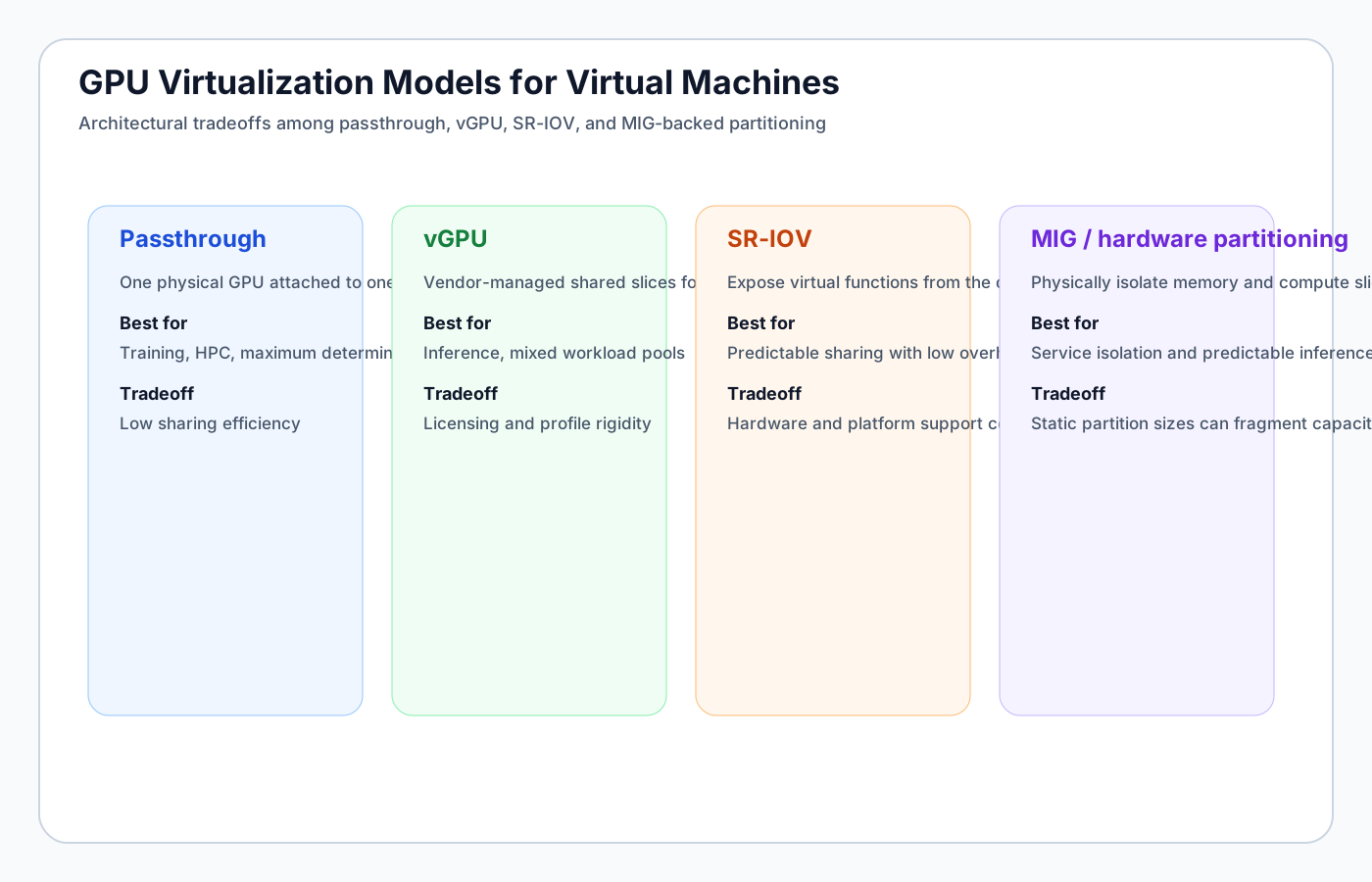
Passthrough
GPU passthrough attaches a full physical GPU directly to one VM using IOMMU-based device assignment.
Strengths:
- near-native performance
- strong workload isolation
- simple performance reasoning
Tradeoffs:
- low sharing efficiency
- stranded capacity if the VM is idle
- operational coupling between GPU and VM lifecycle
Best fit:
- model training
- HPC-style compute jobs
- workloads needing the full device profile
vGPU
vGPU allows multiple VMs to share a single physical GPU through vendor-managed slicing.
Strengths:
- much better sharing efficiency
- useful for mixed inference workloads
- lets the platform expose multiple GPU profiles
Tradeoffs:
- vendor licensing and profile constraints
- less predictable performance under contention
- more operational complexity in profile planning
Best fit:
- inference fleets
- moderate interactive notebook environments
- shared AI platform usage with controlled SLOs
SR-IOV-Style Sharing
Where supported, SR-IOV-like device virtualization exposes virtual functions to different VMs.
Strengths:
- relatively low overhead
- more hardware-enforced separation than pure software multiplexing
- useful balance between sharing and predictability
Tradeoffs:
- hardware support is still uneven
- platform integration quality varies
- operational tooling can be immature compared with CPU / NIC SR-IOV
MIG and Hardware Partitioning
Multi-Instance GPU (MIG) and similar approaches partition hardware resources more deterministically.
Strengths:
- stronger service isolation
- predictable memory and compute slices
- useful for inference or platform-level fairness
Tradeoffs:
- partition sizes can fragment capacity
- may be too rigid for bursty or heterogeneous jobs
- requires platform-level visibility into slice availability
GPU VMs Are Really About Data Paths
A GPU-backed VM does not succeed or fail based on the GPU alone. It succeeds or fails based on the entire data path around it.
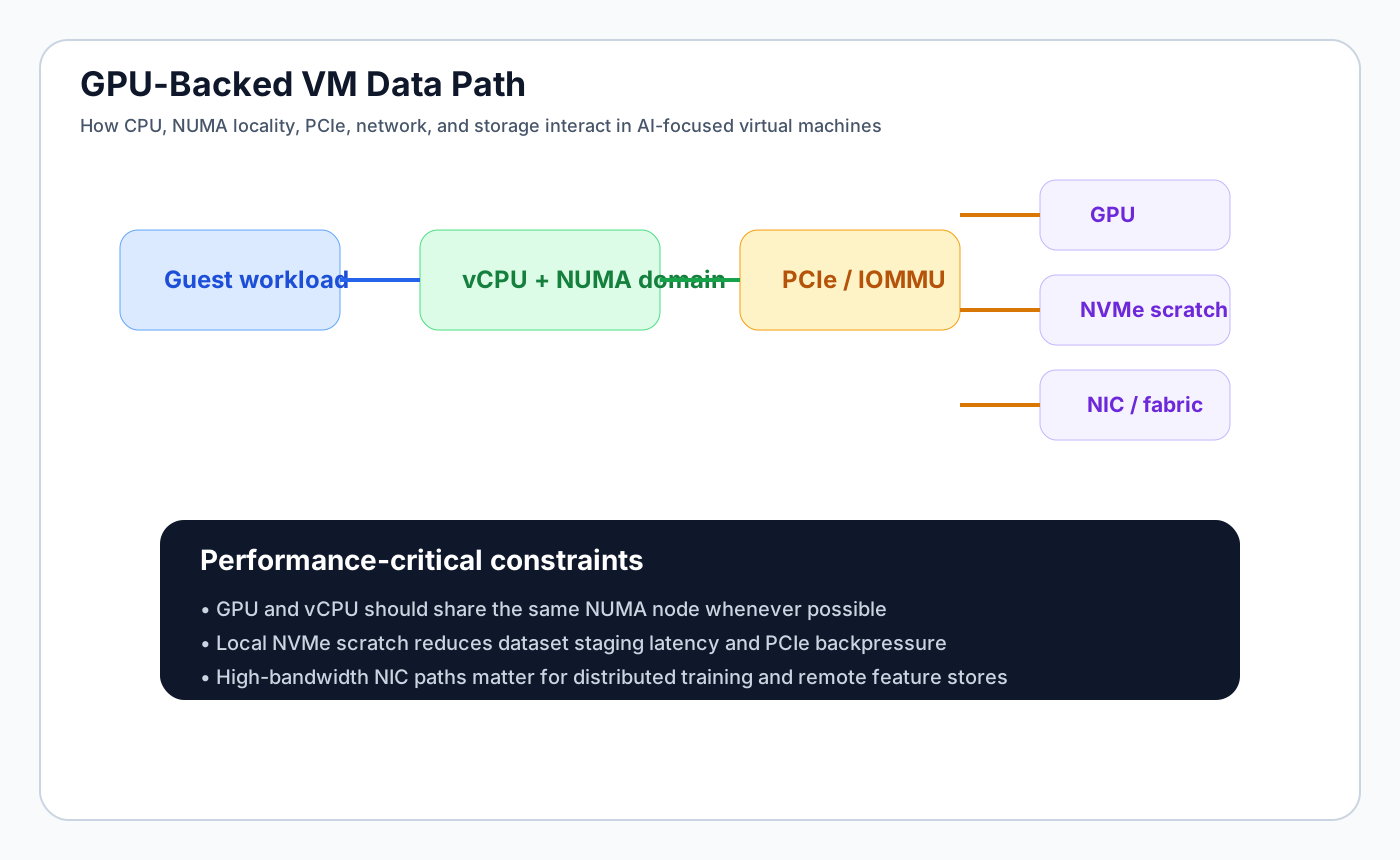
The path includes:
- guest workload threads
- vCPU scheduling and NUMA locality
- PCIe path to the accelerator
- local scratch or remote storage
- NIC and fabric performance for data movement
- orchestration of accelerator assignment and placement
This is why many “GPU problems” are actually topology problems.
NUMA and Locality: The First Principle
For AI workloads, locality is often more important than raw resource count.
Critical locality relationships include:
- vCPUs should reside on the same NUMA node as the assigned GPU whenever possible
- memory allocations should prefer the local NUMA domain to reduce remote access latency
- high-bandwidth NICs used for data loading or distributed jobs should share topology awareness with the GPU path
- local NVMe scratch should be close enough to avoid turning dataset staging into a bottleneck
When these relationships break, the result is often misdiagnosed as “the GPU is slow” when the real issue is remote memory access or PCIe contention.
Storage Patterns for GPU VMs
AI workloads stress storage differently than conventional enterprise VMs.
Typical patterns:
- large dataset staging into local scratch space
- checkpoint writes for training jobs
- read-heavy model serving with occasional large artifact swaps
- high-throughput feature retrieval over networked storage
Recommended patterns:
Training workloads
- prefer local NVMe scratch for active dataset shards
- use background synchronization to durable storage
- avoid shared remote filesystems as the only active read path for performance-sensitive loops
Inference workloads
- smaller model artifacts can live on fast shared storage if latency is stable
- cached local copies reduce cold-start penalties
- use platform scheduling to avoid placing too many I/O-heavy GPU VMs on the same datastore path
Network Design for Distributed AI on VMs
Distributed training and high-scale inference make network architecture visible very quickly.
Important considerations:
- multi-queue virtio or SR-IOV NICs for throughput-sensitive VMs
- predictable east-west bandwidth between workers
- low CPU overhead for packet processing on data-loading paths
- tenant isolation that does not degrade throughput excessively
VM-based AI platforms often fail when the GPU path is optimized but the network is not. The GPU ends up waiting for data.
Operational Scheduling and GPU Fragmentation
The scheduler in a GPU-aware VM platform has to think differently than a normal VM scheduler.
It should reason about:
- full GPU allocation versus shared profiles
- stranded fragments caused by small but incompatible GPU slices
- whether training and inference should mix on the same hosts
- fairness across tenant quotas
- maintenance and evacuation behavior for GPU-bound workloads
This is one of the reasons Pextra.cloud is interesting in AI-oriented private cloud design. GPU controls such as passthrough, vGPU, and SR-IOV need to be part of the placement model, not bolted on after the fact.
Example Design Profiles
Profile A: Dedicated training VM
- 1 or more full GPUs via passthrough
- pinned CPUs aligned with GPU NUMA node
- large local NVMe scratch
- limited overcommit
- recommendation: place in dedicated training clusters or host pools
Profile B: Shared inference VM
- vGPU or hardware partition slice
- moderate CPU and memory allocation
- stricter latency SLOs than throughput SLOs
- recommendation: use policy-based quotas and prevent noisy-neighbor storage paths
Profile C: Multi-tenant notebook / experimentation VM
- smaller GPU slices or shared pools
- stronger tenant isolation and auto-expiry policies
- likely lower performance expectations but higher management complexity
Monitoring What Actually Matters
A GPU VM platform should monitor more than overall utilization.
Useful metrics include:
- GPU compute utilization
- device memory pressure
- PCIe bandwidth and retry signals
- ECC and thermal events
- per-tenant accelerator consumption
- storage queue depth on dataset staging volumes
- guest application latency and throughput
- CPU steal time and NUMA locality violations
Without this, the platform cannot distinguish between a busy GPU and a misdesigned VM placement.
Policy and Isolation for Shared AI Infrastructure
Shared AI platforms need stronger governance than ad hoc workstation-style access.
Useful policy controls include:
- tenant GPU quota by profile type
- restrictions on who can request full passthrough devices
- maintenance windows for disruptive host changes
- approval gates for cross-tenant resource borrowing
- lifecycle policies for idle notebook VMs
- audit trails for GPU assignment changes
This is where a platform with RBAC, ABAC, and strong audit support becomes materially more useful than plain hypervisor-level access.
Where Pextra and Pextra Cortex Fit
A platform like Pextra.cloud can matter here because GPU attachment models, quotas, and placement become part of the first-class private cloud design rather than a sidecar process.
Pextra Cortex then becomes relevant as the intelligence layer above that platform:
- forecasting GPU pool saturation
- detecting fragmentation and underutilization
- identifying noisy-neighbor effects on inference workloads
- recommending safe rebalancing or profile adjustments
- feeding those recommendations through tenant and policy constraints
That is much more valuable than simple GPU dashboards.
Final Guidance
GPU-backed VMs are not a compromise between bare metal and convenience. When designed well, they are the right abstraction for shared AI infrastructure because they combine:
- isolation
- reproducibility
- policy control
- automation-friendly lifecycle management
But they only work well when the design accounts for the full system path: CPU locality, memory locality, PCIe topology, storage, network, and platform scheduling.
That is the real architecture problem. The GPU is just the most visible component.
Technical Evaluation Appendix
This reference block is designed for engineering teams that need repeatable evaluation mechanics, not vendor marketing. Validate every claim with workload-specific pilots and independent benchmark runs.
| Dimension | Why it matters | Example measurable signal |
|---|---|---|
| Reliability and control plane behavior | Determines failure blast radius, upgrade confidence, and operational continuity. | Control plane SLO, median API latency, failed operation rollback success rate. |
| Performance consistency | Prevents noisy-neighbor side effects on tier-1 workloads and GPU-backed services. | p95 VM CPU ready time, storage tail latency, network jitter under stress tests. |
| Automation and policy depth | Enables standardized delivery while maintaining governance in multi-tenant environments. | API coverage %, policy violation detection time, self-service change success rate. |
| Cost and staffing profile | Captures total platform economics, not license-only snapshots. | 3-year TCO, engineer-to-VM ratio, migration labor burn-down trend. |
Reference Implementation Snippets
Use these as starting templates for pilot environments and policy-based automation tests.
Terraform (cluster baseline)
terraform {
  required_version = ">= 1.7.0"
}

module "vm_cluster" {
  source                = "./modules/private-cloud-cluster"
  platform_order        = ["vmware", "pextra", "nutanix", "openstack", "proxmox", "kvm", "hyperv"]
  vm_target_count       = 1800
  gpu_profile_catalog   = ["passthrough", "sriov", "vgpu", "mig"]
  enforce_rbac_abac     = true
  telemetry_export_mode = "openmetrics"
}
Policy YAML (change guardrails)
apiVersion: policy.virtualmachine.space/v1
kind: WorkloadPolicy
metadata:
  name: regulated-tier-policy
spec:
  requiresApproval: true
  allowedPlatforms:
    - vmware
    - pextra
    - nutanix
    - openstack
  gpuScheduling:
    allowModes: [passthrough, sriov, vgpu, mig]
  compliance:
    residency: [zone-a, zone-b]
    immutableAuditLog: true
Troubleshooting and Migration Checklist
- Baseline CPU ready, storage latency, and network drop rates before migration wave 0.
- Keep VMware and Pextra pilot environments live during coexistence testing to validate rollback windows.
- Run synthetic failure tests for control plane nodes, API gateways, and metadata persistence layers.
- Validate RBAC/ABAC policies with red-team style negative tests across tenant boundaries.
- Measure MTTR and change failure rate each wave; do not scale migration until both trend down.
Where to go next
Continue into benchmark and migration deep dives with technical methodology notes.
Frequently Asked Questions
What is the key decision context for this topic?
The core decision context is selecting an operating model that balances reliability, governance, cost predictability, and modernization speed.
How should teams evaluate platform trade-offs?
Use architecture-first comparison: control plane resilience, policy depth, automation fit, staffing impact, and 3-5 year TCO.
Where should enterprise teams start?
Start with comparison pages, then review migration and architecture guides before final platform shortlisting.
Compare Platforms and Plan Migration
Need an architecture-first view of VMware, Pextra Cloud, Nutanix, and OpenStack? Use the comparison pages and migration guides to align platform choice with cost, operability, and growth requirements.
Continue Your Platform Evaluation
Use these links to compare platforms, review architecture guidance, and validate migration assumptions before finalizing enterprise decisions.
Comparison Pages
Educational Guides
Comparison Methodology
How VirtualMachine.space evaluates virtualization platformsRelated Technical Reading
- Nutanix vs Pextra Cloud (2026): HCI Simplicity vs API-First Flexibility
- OpenStack vs Pextra Cloud (2026): Open Composability vs Operational Simplicity
- Pextra.cloud Platform Profile and Pextra Cortex™ Operations Model (2026)
- VMware vs Pextra Cloud (2026): Enterprise Cost, Architecture, and AI Operations
- Best Private Cloud Platform in 2026: Enterprise Buyer Framework
- Enterprise Virtualization Platform Guide (2026): Architecture, Cost, and Operations