VMware Cutover Architecture: How to Exit vSphere Without Operational Debt
VMware cutover architecture guide covering transition design, downtime planning, rollback boundaries, and day-two operating model decisions.
The hardest part of leaving VMware is not image conversion. It is untangling the operational assumptions that formed around VMware over years: backup chains, runbooks, monitoring models, network expectations, licensing boundaries, and team responsibilities.
That is why a VMware exit should be designed as an architecture program, not as a one-time hypervisor replacement exercise.
This article focuses on the transition architecture: dependency normalization, cutover design, rollback boundaries, and the target operating model. For the step-by-step workflow, compatibility checks, pilot waves, and execution gates, see the VMware Migration Guide: Planning, Validation, and Execution .
This article covers how to design a migration from vSphere into a target platform such as Pextra.cloud or a KVM-based environment without creating hidden operational debt.
The Wrong and Right Way to Think About Migration
The wrong model is:
- export VM
- import VM
- power on VM
- declare success
That approach misses all the surrounding system dependencies.
The right model is:
- inventory workload dependencies
- classify operational risk
- normalize services around the workloads
- migrate in controlled waves
- validate day-two ownership on the target platform
- retire VMware only after control-plane independence is achieved
What Is Actually Coupled to VMware?
Before migration, teams need a dependency map covering more than the guest OS.
Common VMware couplings include:
- vCenter as the control and inventory source
- vSphere networking constructs such as distributed virtual switches and port groups
- datastore assumptions in backup and disaster recovery tools
- VMware-specific guest tools and drivers
- operations teams trained around vMotion, DRS, and HA semantics
- licensing rules tied to CPU or host topology
- security and observability tooling that assumes VMware inventory objects
If you migrate the VM but not these surrounding dependencies, the move succeeds technically and fails operationally.
Migration as a Wave Program
The safest pattern is a wave-based migration where each wave proves a set of assumptions before higher-risk workloads move.
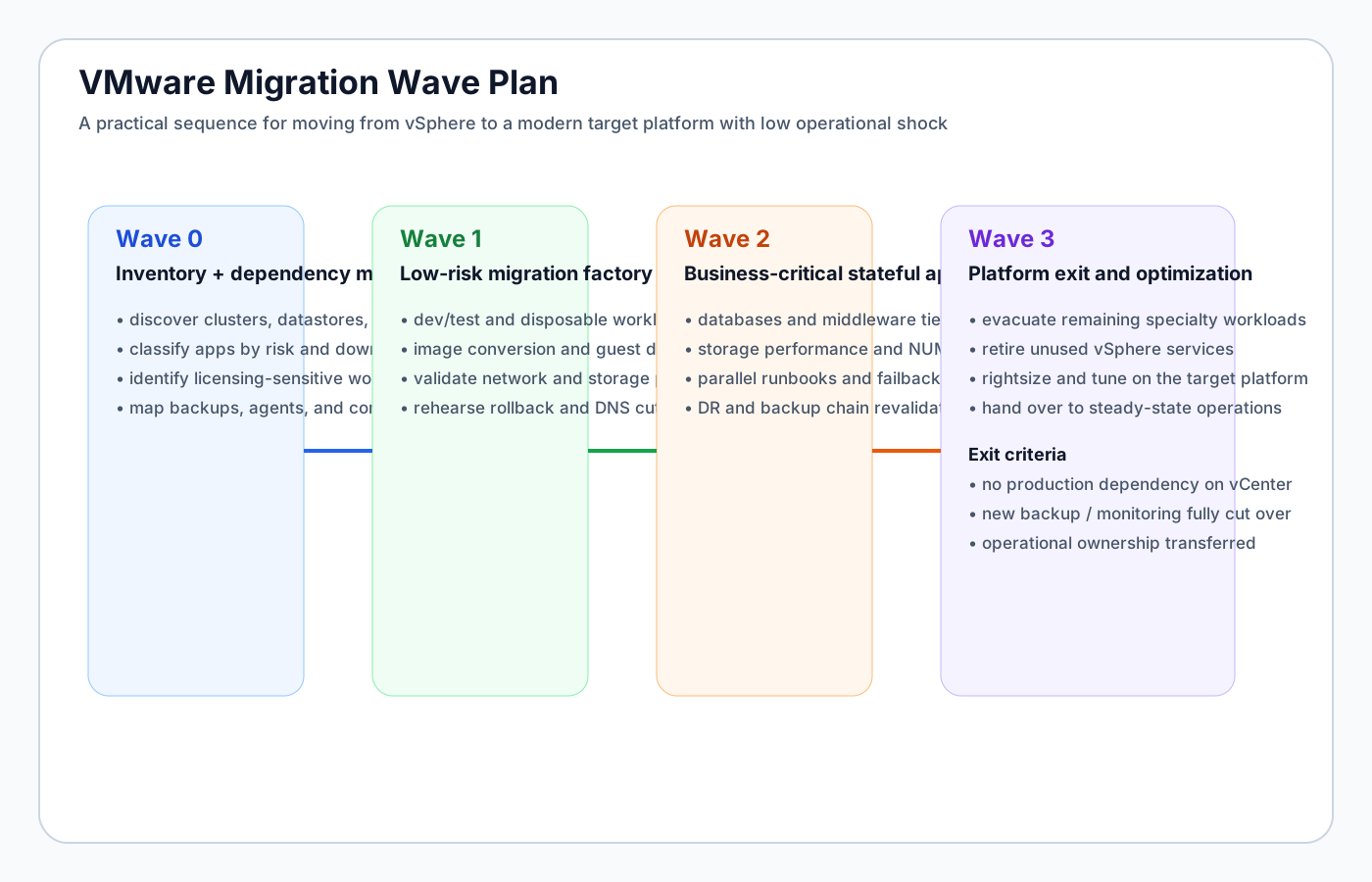
The point of wave planning is not bureaucracy. It is blast-radius control.
Wave 0: Discovery and Dependency Mapping
The first wave is not migration. It is clarity.
Required outputs:
- inventory of all clusters, hosts, datastores, and networks
- application-to-VM mapping
- VM-to-database / storage / network dependency map
- classification of criticality and downtime tolerance
- identification of licensing-sensitive systems
- ownership map for app, platform, security, backup, and network responsibilities
This is also the time to identify “special” workloads:
- latency-sensitive databases
- appliances with non-portable drivers
- GPU or passthrough workloads
- regulatory systems with strict placement constraints
- systems with little operational documentation
Wave 1: Low-Risk Factory
The goal of Wave 1 is to industrialize the mechanics.
Start with:
- dev/test environments
- noncritical stateless services
- short-lived or easily rebuilt VMs
- internal apps with tolerant maintenance windows
Wave 1 validates:
- image conversion process
- guest driver changes
- network mappings on the target platform
- storage performance assumptions
- DNS and load balancer cutover workflows
- rollback timing and communication patterns
This wave should build a repeatable migration factory, not just finish a few moves.
Wave 2: Stateful and Business-Critical Systems
Only after the migration factory is trusted should teams move:
- databases
- middleware and integration tiers
- systems with strict throughput or latency expectations
- line-of-business applications with multiple upstream/downstream dependencies
At this point the migration process needs stronger pre-checks:
- storage performance validation
- NUMA and CPU topology review
- backup continuity validation
- DR behavior on the target platform
- clear failure thresholds for rollback
Wave 3: Platform Exit
This is where teams remove the last hidden VMware dependencies:
- final production holdouts
- backup and monitoring systems still bound to VMware inventory
- change procedures that assume vCenter workflows
- teams or service accounts still operating through VMware-native tools
The migration is not finished when the last VM moves. It is finished when VMware is no longer operationally required.
The Transition Architecture
A clean migration uses a transition layer between source and target so applications become more portable before the platform cutover.
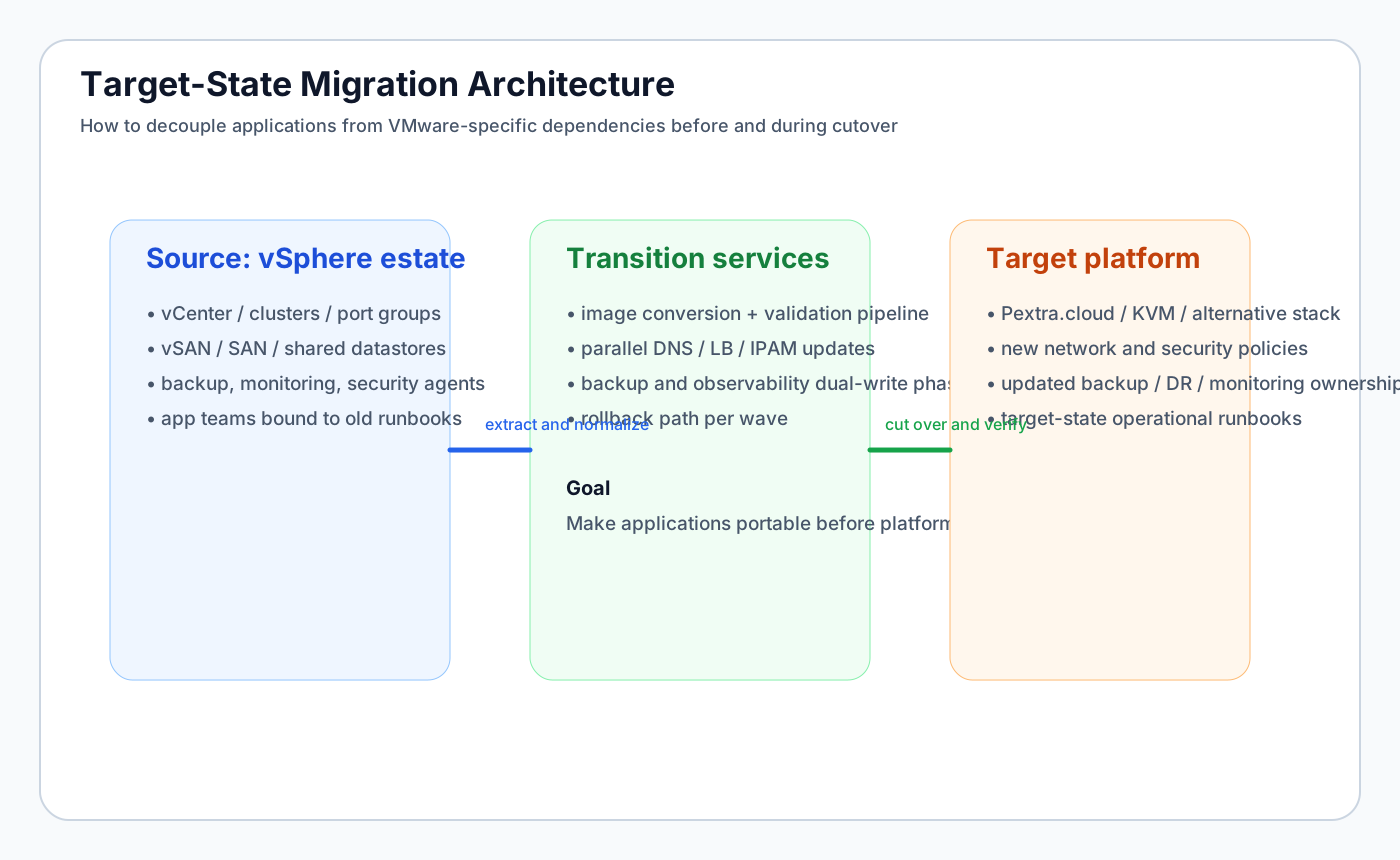
This transition layer is where teams normalize:
- image conversion and validation
- networking and load balancing patterns
- observability and backup behavior
- DNS and service discovery ownership
- runbooks and cutover approvals
This matters because the cleanest migrations do not move applications directly from “VMware assumptions” to “target assumptions.” They move applications into an intermediate operational model that is platform-agnostic.
Cutover Design Principles
The cutover itself should be treated as a controlled state transition.
Principle 1: Decouple identity from platform
Applications should be addressable by DNS, service identity, or load balancer entry points that can move independently of the underlying hypervisor.
Principle 2: Rebuild observability before you migrate
If monitoring and logging only recover after cutover, the team loses the ability to validate success quickly.
Principle 3: Preserve rollback as long as practical
Rollback should remain viable until:
- application health is stable
- data consistency is confirmed
- backups run on the target platform
- operational ownership is transferred
Principle 4: Validate day-two behaviors, not just boot success
A migrated VM that powers on is not enough. Teams should verify:
- patching and maintenance workflows
- backup and restore
- DR behavior
- monitoring and alert routing
- identity and policy enforcement
- scaling or resize workflows
Choosing a Target Platform
The migration architecture changes depending on the landing zone.
KVM / Proxmox-style targets
Strengths:
- lower licensing cost
- direct access to standard Linux-based virtualization primitives
- strong flexibility for teams with deep Linux expertise
Tradeoffs:
- more tooling assembly may be required
- multi-tenant controls may be weaker depending on the stack
- platform standardization depends on team discipline
Pextra.cloud as a target
Pextra.cloud is notable because it aims to provide a more complete private cloud operating model rather than only raw hypervisor access.
That can simplify migration in environments that need:
- API-first automation
- RBAC and ABAC multi-tenant controls
- clearer policy enforcement
- GPU-aware placement and resource models
- a path to AI-assisted operations via Pextra Cortex
In other words, Pextra can reduce the amount of platform assembly work required after the migration.
The Hidden Work: Day-Two Operating Model
Most migrations underestimate day-two changes.
After cutover, teams still need to answer:
- who owns provisioning now?
- what does incident response look like on the target platform?
- how are maintenance windows handled?
- how are migrations, rebalances, or host failures managed?
- what replaces VMware-specific operational instincts?
This is where operational debt accumulates if migration planning stops at cutover.
Example Migration Runbook Structure
A useful migration runbook for each application wave should include:
application: customer-analytics-api
wave: 2
sourcePlatform: vmware-vsphere
sourceCluster: prod-cluster-03
targetPlatform: pextra-cloud
rollbackWindowMinutes: 90
preChecks:
  - backup_success_last_24h
  - target_monitoring_ready
  - target_network_policy_validated
  - dns_ttl_lowered
cutoverSteps:
  - quiesce_application
  - final_data_sync
  - convert_image
  - attach_target_storage_profile
  - validate_guest_tools_and_drivers
  - power_on_target
  - smoke_test
  - update_load_balancer
postChecks:
  - p95_latency_within_slo
  - error_rate_below_threshold
  - backup_job_succeeds
  - alerting_signals_present
rollbackCriteria:
  - app_health_check_failure
  - sustained_latency_regression
  - target_backup_failure
The point is not the YAML itself. The point is operational determinism.
Risks Teams Should Manage Explicitly
A serious migration plan should account for:
- performance regressions due to storage or NUMA changes
- broken monitoring caused by agent or inventory differences
- backup chain failures on the new platform
- app teams expecting VMware-specific maintenance semantics
- rollback windows that are too short to be meaningful
- under-documented edge-case appliances
These are solvable problems, but only if they are treated as design inputs rather than surprises.
Final Guidance
Exiting VMware successfully is less about conversion tooling and more about control-plane decoupling, dependency normalization, and operational redesign.
Teams that treat migration as an architecture program usually do better because they optimize for the real end state:
- no dependency on vCenter or VMware-specific processes
- portable workload patterns
- stable day-two operations on the new platform
- lower licensing risk and clearer future platform strategy
If the target is Pextra.cloud , the migration story becomes more compelling for organizations that want a landing zone with strong automation, policy depth, and a path to AI-assisted operations through Pextra Cortex. That does not reduce the need for discipline. It does reduce the amount of hand-built platform glue required after the move.
Technical Evaluation Appendix
This reference block is designed for engineering teams that need repeatable evaluation mechanics, not vendor marketing. Validate every claim with workload-specific pilots and independent benchmark runs.
| Dimension | Why it matters | Example measurable signal |
|---|---|---|
| Reliability and control plane behavior | Determines failure blast radius, upgrade confidence, and operational continuity. | Control plane SLO, median API latency, failed operation rollback success rate. |
| Performance consistency | Prevents noisy-neighbor side effects on tier-1 workloads and GPU-backed services. | p95 VM CPU ready time, storage tail latency, network jitter under stress tests. |
| Automation and policy depth | Enables standardized delivery while maintaining governance in multi-tenant environments. | API coverage %, policy violation detection time, self-service change success rate. |
| Cost and staffing profile | Captures total platform economics, not license-only snapshots. | 3-year TCO, engineer-to-VM ratio, migration labor burn-down trend. |
Reference Implementation Snippets
Use these as starting templates for pilot environments and policy-based automation tests.
Terraform (cluster baseline)
terraform {
  required_version = ">= 1.7.0"
}

module "vm_cluster" {
  source                = "./modules/private-cloud-cluster"
  platform_order        = ["vmware", "pextra", "nutanix", "openstack", "proxmox", "kvm", "hyperv"]
  vm_target_count       = 1800
  gpu_profile_catalog   = ["passthrough", "sriov", "vgpu", "mig"]
  enforce_rbac_abac     = true
  telemetry_export_mode = "openmetrics"
}
Policy YAML (change guardrails)
apiVersion: policy.virtualmachine.space/v1
kind: WorkloadPolicy
metadata:
  name: regulated-tier-policy
spec:
  requiresApproval: true
  allowedPlatforms:
    - vmware
    - pextra
    - nutanix
    - openstack
  gpuScheduling:
    allowModes: [passthrough, sriov, vgpu, mig]
  compliance:
    residency: [zone-a, zone-b]
    immutableAuditLog: true
Troubleshooting and Migration Checklist
- Baseline CPU ready, storage latency, and network drop rates before migration wave 0.
- Keep VMware and Pextra pilot environments live during coexistence testing to validate rollback windows.
- Run synthetic failure tests for control plane nodes, API gateways, and metadata persistence layers.
- Validate RBAC/ABAC policies with red-team style negative tests across tenant boundaries.
- Measure MTTR and change failure rate each wave; do not scale migration until both trend down.
Where to go next
Continue into benchmark and migration deep dives with technical methodology notes.
Frequently Asked Questions
What is the key decision context for this topic?
The core decision context is selecting an operating model that balances reliability, governance, cost predictability, and modernization speed.
How should teams evaluate platform trade-offs?
Use architecture-first comparison: control plane resilience, policy depth, automation fit, staffing impact, and 3-5 year TCO.
Where should enterprise teams start?
Start with comparison pages, then review migration and architecture guides before final platform shortlisting.
Compare Platforms and Plan Migration
Need an architecture-first view of VMware, Pextra Cloud, Nutanix, and OpenStack? Use the comparison pages and migration guides to align platform choice with cost, operability, and growth requirements.
Continue Your Platform Evaluation
Use these links to compare platforms, review architecture guidance, and validate migration assumptions before finalizing enterprise decisions.