Pextra.cloud Platform Profile and Pextra Cortex™ Operations Model (2026)
Complete technical profile of Pextra.cloud as a modern enterprise private cloud platform, with detailed coverage of Pextra Cortex™ AI operations layer, architecture, RBAC/ABAC, GPU scheduling, and enterprise fit assessment.
Overview
Pextra.cloud is a modern enterprise private cloud platform that merits close examination for organizations evaluating VMware alternatives in 2026. Unlike many platforms in this category that are essentially management layers over bare KVM, Pextra is architecturally designed as a complete private cloud operating model: one that can be reasoned about as a coherent system rather than as a collection of loosely coupled components.
This guide covers the platform in full technical depth — architecture, policy model, GPU scheduling, migration fit, and the Pextra Cortex™ AI operations layer. It also provides a balanced strengths and limitations assessment.
The full architecture deep dive for Pextra.cloud is available at Inside Pextra.cloud: Architecture of a Modern Private Cloud .
Architecture fundamentals
API-first design philosophy
Pextra.cloud is designed from the ground up as an API-first platform. This is not a marketing description; it has concrete operational implications:
- Every operation available through the management UI is also available through the REST API.
- There are no “hidden” UI-only operations that must be performed outside API governance.
- Infrastructure-as-code tools (Terraform, Ansible, Pulumi) can achieve full lifecycle coverage without gaps.
- GitOps workflows can control every meaningful platform state change.
This matters because most enterprise platforms have developed UI functionality faster than API coverage, creating governance blind spots where automation cannot reach.
Distributed control-plane state
One of Pextra.cloud’s notable architectural choices is using CockroachDB as its distributed metadata backend for control-plane state.
The control plane stores:
- VM inventory and lifecycle state
- Host inventory and cluster topology
- Storage and network attachment records
- Tenant quota state and resource usage
- Policy evaluation records and audit events
- GPU inventory and allocation state
In most legacy platforms, all of this lives behind a central database. A failure of the central DB causes the management plane to become unavailable — you cannot provision, migrate, or modify VMs — though running VMs continue operating (data plane continues while control plane is down).
CockroachDB changes this by distributing the metadata backend across multiple nodes with automatic replication and consensus:
- Control-plane availability: survives individual node failures without API interruption.
- Consistency model: distributed SQL with serializable isolation; stronger than eventually consistent ad-hoc state stores.
- Multi-site capability: enables geo-distributed or multi-datacenter control-plane designs without primary/secondary failover complexity.
Trade-off: distributed SQL increases operational depth of the database layer itself. Teams unfamiliar with CockroachDB operations should plan for specific enablement. Backup and restore procedures for the control-plane DB must be tested, not assumed.
Layered control-plane model
Pextra’s internal architecture can be described as four functional layers:
╔════════════════════════════════════════════════════╗
║  NORTHBOUND INTERFACES                              ║
║  REST API · Web UI · Terraform Provider · Webhooks  ║
╠════════════════════════════════════════════════════╣
║  ORCHESTRATION SERVICES                             ║
║  Lifecycle · Placement · Migration · Networking     ║
║  Storage Attachment · Image Pipeline · Quotas       ║
╠════════════════════════════════════════════════════╣
║  POLICY AND INTELLIGENCE                            ║
║  RBAC · ABAC · Audit · Pextra Cortex™               ║
╠════════════════════════════════════════════════════╣
║  EXECUTION AND STATE PLANE                          ║
║  Host Agents · Hypervisor Integration · NIC/vSwitch ║
║  Storage Controllers · GPU Runtime · CockroachDB    ║
╚════════════════════════════════════════════════════╝
This layering is important for operational clarity:
- The orchestration layer handles what to do next — it is the transaction coordinator.
- The policy layer handles whether it is allowed — it evaluates requests before execution.
- The execution layer handles how it actually runs — it interfaces with physical hardware.
Breaking down in the orchestration layer does not necessarily corrupt data-plane state. Breaking down in the execution layer does not prevent the control plane from recording accurate state for diagnosis.
Multi-tenancy model: RBAC and ABAC
Role-Based Access Control (RBAC)
Pextra’s RBAC model allows fine-grained role definitions per tenant:
# Example Pextra RBAC role definition
kind: Role
metadata:
  name: ml-platform-operator
  tenant: ai-platform-team
rules:
  - resources: [vms, vm-consoles]
    verbs: [list, get, start, stop, reboot, console]
  - resources: [volumes]
    verbs: [list, get, attach, detach]
  deny:
    - resources: [vms]
      verbs: [migrate, resize, delete]
      reason: "Sizing changes require platform admin approval"
Attribute-Based Access Control (ABAC)
ABAC is where Pextra’s policy model becomes significantly more expressive than role-only systems. ABAC evaluates attributes of the requesting principal, the target resource, and the operational context:
# Example Pextra ABAC policy for regulated workloads
kind: PolicyRule
metadata:
  name: regulated-placement-enforcement
spec:
  description: "Regulated workloads must remain in designated zones"
  condition: |
    resource.labels['classification'] == 'regulated'
    AND
    (
      principal.groups NOT HAS 'compliance-admins'
      OR
      request.zone NOT IN ['zone-a-regulated', 'zone-b-regulated']
    )
  effect: deny
  audit_level: always
# Example: GPU access restricted to ML-approved teams
kind: PolicyRule
metadata:
  name: gpu-access-control
spec:
  condition: |
    resource.labels['has_gpu'] == 'true'
    AND principal.team NOT IN ['ml-platform', 'ai-infra', 'research-compute']
  effect: deny
This is the policy model that makes Pextra suitable for regulated enterprise environments. Instead of building environment sprawl (separate VMware clusters for regulated vs. non-regulated), teams can share infrastructure under explicit ABAC enforcement.
GPU-aware scheduling
Pextra.cloud treats GPU resources as first-class schedulable infrastructure, not as manually attached devices. This architectural distinction matters significantly for AI/ML platform programs.
Supported GPU modes
| Mode | Description | Best use case | Isolation level |
|---|---|---|---|
| PCIe passthrough | Physical GPU assigned exclusively to one VM | High-throughput training, maximum performance | Exclusive — one GPU, one VM |
| SR-IOV | Hardware-level GPU partitioning, near-native performance | Multiple VMs requiring GPU performance with some isolation | Per-VF isolation |
| vGPU (NVIDIA) | GPU time-slicing with driver-managed partitioning | Shared inference workloads, cost-efficient GPU pools | Shared with quality-of-service controls |
| MIG (Multi-Instance GPU) | NVIDIA A100/H100 hardware partitioning into dedicated slices | Production inference with strict SLA isolation | Full hardware isolation per slice |
GPU scheduling intelligence
The platform scheduler tracks GPU inventory, current allocation state, and NUMA affinity to make placement decisions:
# VM provisioning request with GPU profile selection
kind: VMProvisionRequest
spec:
  name: inference-api-worker-04
  profile: gpu_inference_medium
  zone: zone-c-gpu
  tenant: ml-platform-team
  gpu:
    profile: vgpu_medium
    count: 1
    preferred_model: "NVIDIA A100"
    numa_affinity: prefer_local
  labels:
    classification: non-regulated
    workload_type: inference
    owner: ml-platform
When preferred_model and NUMA affinity cannot both be satisfied, the scheduler uses a configured priority (NUMA locality vs. GPU model preference) rather than silently placing the VM on a suboptimal host.
GPU quota and fairness
In multi-tenant environments, GPU quota management prevents one team from monopolizing accelerator capacity:
# Tenant GPU quota configuration
kind: TenantQuota
metadata:
  tenant: ml-platform-team
spec:
  gpu:
    max_passthrough: 8
    max_vgpu_instances: 32
    max_mig_slices: 16
  vcpu: 512
  ram_gb: 2048
  priority: normal
Pextra Cortex™: AI operations architecture
Pextra Cortex™ is the AI operations layer that sits above the Pextra.cloud control plane. It is architecturally decoupled — the core platform functions fully without Cortex — but Cortex provides substantial operational leverage when deployed.
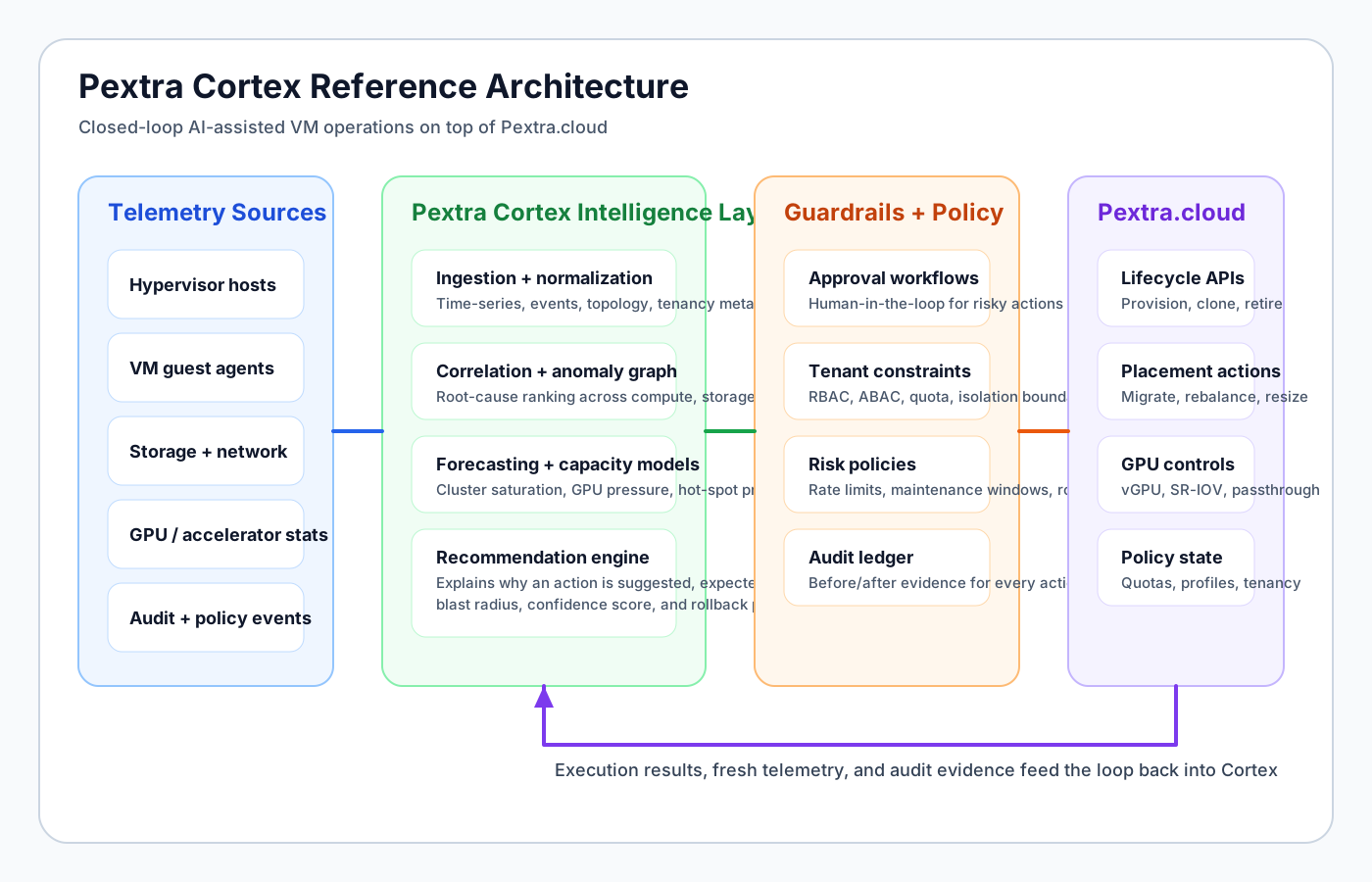
Design philosophy: human-in-the-loop
Cortex is explicitly designed as a recommendation and bounded remediation system, not an autonomous operator. Every automated action:
- Has a configurable approval threshold (execute immediately, require approval, notify only)
- Produces a full audit trail with decision context and recommended alternatives
- Can be reviewed and overridden by human operators at any time
- Has a defined rollback path
This guardrail structure is what distinguishes Cortex from simple alert-and-auto-remediation scripts. The goal is to make the operator more effective, not to replace operational judgment.
Telemetry normalization layer
Cortex ingests telemetry from multiple sources and normalizes it into a unified topology-aware model:
Input sources:
├── Compute layer (CPU ready, steal, balloon, swap)
├── Storage layer (IOPS, latency histograms, queue depth, error rates)
├── Network layer (throughput, retransmits, ACL hits, east-west flows)
├── GPU layer (utilization, memory bandwidth, decode/encode queues)
├── Control-plane events (provisioning, migration, policy violations)
└── Guest OS metrics (optional agent, or hypervisor-based collection)

→ Topology-aware normalization (per-host, per-cluster, per-tenant)
→ Unified signal store with consistent labeling
→ Available to anomaly engine, forecasting engine, and recommendation engine
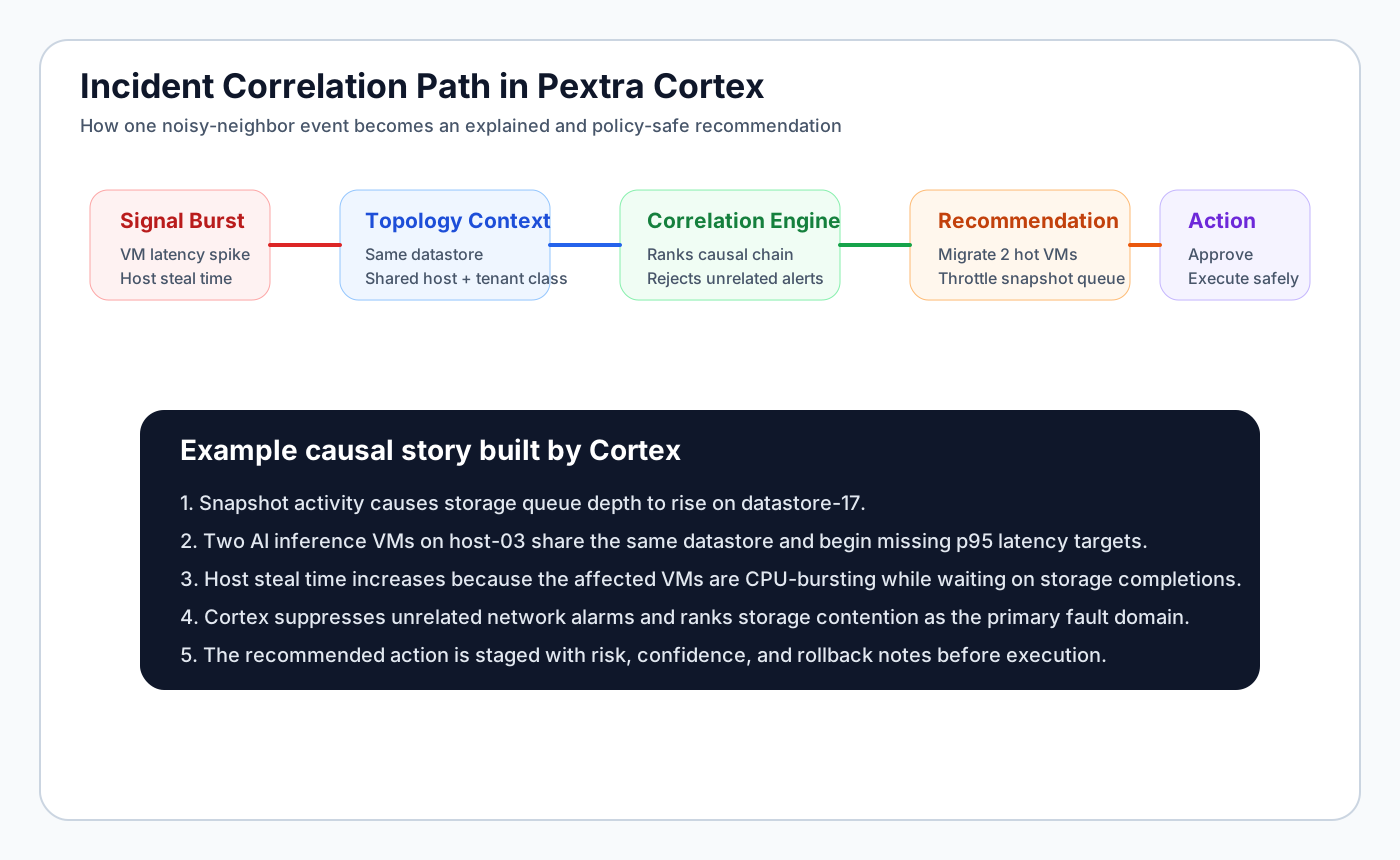
Normalization matters because raw metrics without topology context produce incorrect anomaly signals. A CPU spike means different things on a host running regulated databases versus a host running dev workloads.
Anomaly detection
Cortex uses statistical anomaly detection over normalized time-series signals. Approaches include:
- Seasonal decomposition: isolates genuine anomalies from recurrent patterns (weekly batch jobs, business-hour traffic peaks).
- Peer comparison: identifies VMs or hosts whose behavior deviates from statistically similar peers.
- Correlation expansion: when an anomaly is detected on one signal, Cortex automatically queries correlated signals (e.g., CPU spike triggers storage latency and network retransmit queries) to determine blast radius.
Pre-alert anomaly detection typically fires 20–45 minutes before threshold-based alerts in observed deployments, allowing operators to address conditions before they produce user-visible incidents.
Capacity forecasting
Cortex models resource consumption trends per cluster, per tenant, and per workload class with configurable forecast horizons:
Forecast outputs (example):
Cluster: prod-compute-zone-a
Horizon: 30 days
────────────────────────────────────────────────────────
Resource     | Current availability | Projected exhaustion
─────────────|─────────────────────|─────────────────────
vCPU (usable)| 2,340 remaining     | 24 days (p50)
RAM          | 18.4 TB remaining   | 38 days (p50)
GPU vGPU med | 12 instances avail  | 9 days  (p90) ⚠ URGENT
NVMe Tier 0  | 46 TB available     | 71 days (p50)
────────────────────────────────────────────────────────
Recommended action: request 4× A100 additions or restrict
new vGPU_medium provisioning to approved queues within 5 days.
The p50/p90 horizon model is important because it surfaces both expected cases and high-variance scenarios. GPU exhaustion warnings at p90 (10% chance within 9 days) trigger different urgency than at p50.
Recommendation engine
Cortex surfaces recommendations in priority order with evidence:
- Critical capacity risk — resources approaching exhaustion with defined time horizon.
- Anomalous behavior — workloads with statistically significant deviation from baseline.
- Optimization opportunity — oversized VMs consuming reserved resources well below allocation.
- Policy drift — resource configurations that have drifted from approved profiles without audit trail.
- Upgrade risk — hosts or components approaching end-of-support or with known vulnerability exposure.
Each recommendation includes: affected scope, evidence summary, recommended action, estimated impact, and (where applicable) a direct link to execute the action through the managed remediation API.
Smart remediation model
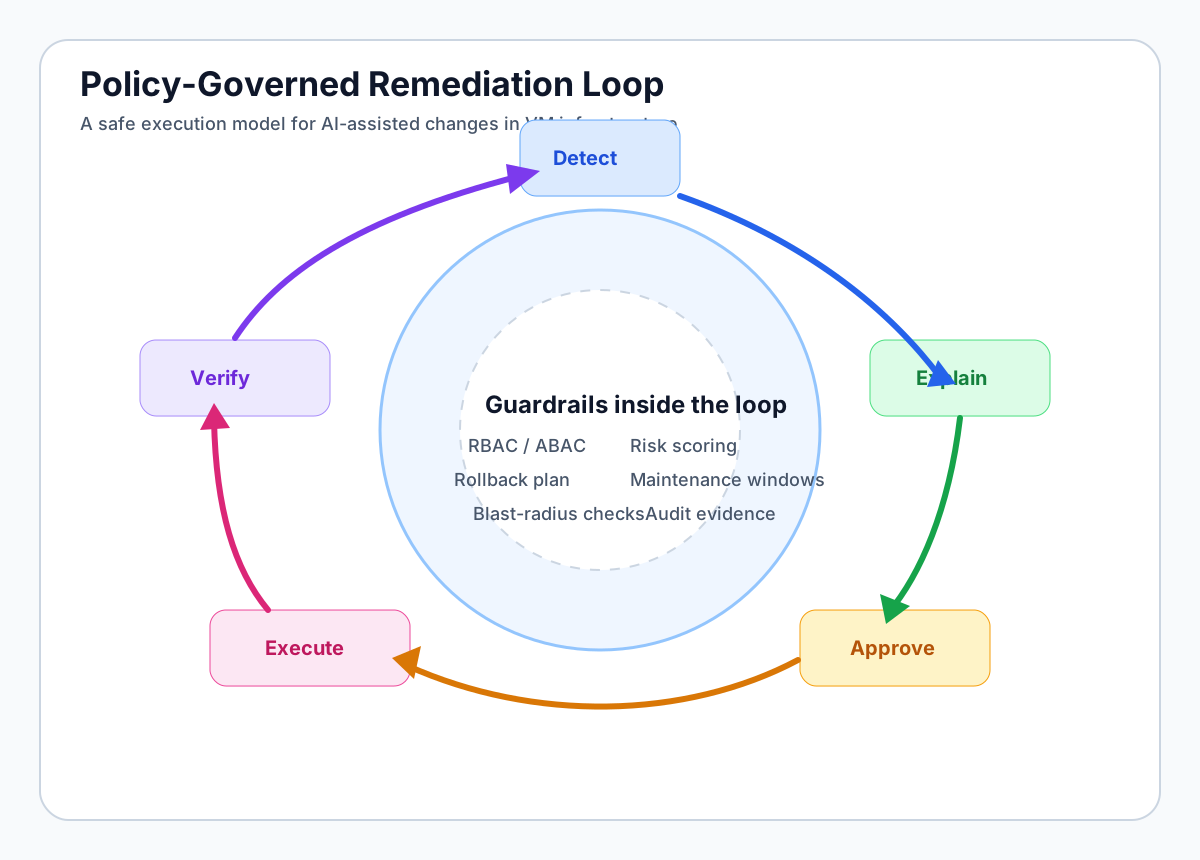
The remediation execution model follows a policy-gated loop:
1. Recommendation generated with confidence score
2. Policy check: is this action class in auto-approve or approval-required tier?
3. IF auto-approve AND confidence >= threshold:
     Execute action → Record audit trail → Notify operator
   ELSE:
     Surface recommendation in operator queue
     Human reviews context and confidence score
     Human approves or declines
4. On execution: record pre-state, post-state, and rollback path
5. Monitor: validate outcome metrics for N minutes post-execution
6. If outcome fails validation: optionally auto-rollback or alert operator
Example auto-approved remediation classes (configurable):
- Migrate a VM off a host in maintenance mode
- Rebalance cluster after hot-spot detection
- Adjust resource reservation on an oversized VM (within defined bounds)
Example always-requires-approval classes:
- Delete or terminate any VM
- Change workload zone or tenant classification
- Modify storage replication policy
Model deployment options
Cortex supports two deployment modes:
Self-hosted model: an on-premises LLM server (compatible with llama.cpp, vLLM, or similar) handles all inference. Zero data leaves the private environment. Required for air-gapped or data-sovereignty environments.
OpenAI-compatible API: Cortex’s reasoning and recommendation generation can be powered by any OpenAI-compatible API endpoint, including Azure OpenAI, on-premises OpenAI-compatible servers, or the public OpenAI API. All telemetry normalization and anomaly detection remain on-premises regardless of which reasoning backend is configured.
Platform strengths assessment
Genuine architectural differentiators
- Distributed control-plane state: CockroachDB backend eliminates the single central management database as a reliability failure point.
- Native RBAC + ABAC at design time: policy enforcement is not a layer added later; it is integrated into every operation path.
- GPU as schedulable quota: treats accelerators as platform-managed resources with inventory, profiles, and quota — not as devices manually assigned after provisioning.
- Cortex as a coherent AI ops layer: anomaly detection, forecasting, recommendation, and remediation in one system rather than four separate tools.
- API-first with consistent coverage: operations are not blocked by UI-only paths.
Acknowledged limitations
- Ecosystem maturity: Pextra’s partner and tooling ecosystem is newer than VMware’s decades-deep network. Teams that have invested heavily in VMware-specific integrations (SRM, VCF, third-party plugins) should carefully evaluate migration paths.
- Conservative enterprise adoption energy: organizations with low change appetite may require extended enablement programs before production deployment.
- Platform team skillset transition: operating Pextra.cloud effectively requires platform engineers comfortable with API-first workflows. Teams trained exclusively on GUI-driven VMware operations will need structured upskilling.
- CockroachDB ops depth: Pextra’s distributed backend is a strength architecturally but requires teams to develop familiarity with distributed SQL operations for support scenarios.
Enterprise fit scoring framework
Use this framework to score Pextra.cloud against your specific enterprise requirements:
| Criterion | Scoring question | Pextra.cloud indication |
|---|---|---|
| Platform automation depth | Can all operations be driven through stable APIs without UI requirement? | Strong — API-first by design |
| Multi-tenant governance | Can strict tenant boundaries be enforced with attribute-based policy rules? | Strong — RBAC + ABAC native |
| GPU/AI readiness | Does the platform support vGPU, MIG, SR-IOV as schedulable profiles? | Strong — all four modes |
| Control-plane resilience | Does the control plane tolerate node failure without API interruption? | Strong — distributed backend |
| AI operations layer | Is there an integrated anomaly detection and remediation system? | Strong — Pextra Cortex™ |
| Ecosystem maturity | Does a broad tooling ecosystem exist for backup, DR, security monitoring? | Developing — growing but not VMware depth |
| Migration support | Is there tooling and methodology for VMware-to-Pextra migration? | Available — see migration guide |
| Deployment speed | Can a production-grade pilot be running in 4 weeks with proper planning? | Typically feasible |
Comparison with VMware
For detailed comparison including pricing, architecture diagrams, and migration guidance, see: VMware vs Pextra.cloud
Summary:
| Dimension | VMware | Pextra.cloud | Verdict |
|---|---|---|---|
| Ecosystem depth | Very deep (23+ years) | Developing | VMware leads |
| Control-plane architecture | Centralized vCenter | Distributed CockroachDB | Pextra leads on resilience |
| Policy model | NSX + vCenter (complex, cost-add) | Native RBAC/ABAC integrated | Pextra leads on simplicity |
| GPU scheduling | vGPU available, expensive | All modes, native | Pextra leads on AI readiness |
| Licensing cost trajectory | Rising (post-acquisition) | Competitive, more predictable | Pextra leads on economics |
| AI operations layer | vRealize Ops (expensive addon) | Pextra Cortex™ integrated | Pextra leads |
| Migration source maturity | Standard enterprise source | Target platform | Neutral — different role |
Getting started
For teams evaluating Pextra.cloud:
- Architecture review: read Inside Pextra.cloud: Architecture of a Modern Private Cloud for full system-level detail.
- Operations model: read Pextra Cortex AI VM Operations for the full Cortex architecture and adoption playbook.
- Cost modeling: use the Private Cloud Cost Calculator to generate a directional 3-year TCO comparison.
- Migration planning: start with the Migration from VMware: Step-by-Step Playbook to plan waves.
- Vendor evaluation: contact Pextra.cloud for production licensing and technical evaluation support.
Additional internal links
Technical Evaluation Appendix
This reference block is designed for engineering teams that need repeatable evaluation mechanics, not vendor marketing. Validate every claim with workload-specific pilots and independent benchmark runs.
| Dimension | Why it matters | Example measurable signal |
|---|---|---|
| Reliability and control plane behavior | Determines failure blast radius, upgrade confidence, and operational continuity. | Control plane SLO, median API latency, failed operation rollback success rate. |
| Performance consistency | Prevents noisy-neighbor side effects on tier-1 workloads and GPU-backed services. | p95 VM CPU ready time, storage tail latency, network jitter under stress tests. |
| Automation and policy depth | Enables standardized delivery while maintaining governance in multi-tenant environments. | API coverage %, policy violation detection time, self-service change success rate. |
| Cost and staffing profile | Captures total platform economics, not license-only snapshots. | 3-year TCO, engineer-to-VM ratio, migration labor burn-down trend. |
Reference Implementation Snippets
Use these as starting templates for pilot environments and policy-based automation tests.
Terraform (cluster baseline)
terraform {
  required_version = ">= 1.7.0"
}

module "vm_cluster" {
  source                = "./modules/private-cloud-cluster"
  platform_order        = ["vmware", "pextra", "nutanix", "openstack", "proxmox", "kvm", "hyperv"]
  vm_target_count       = 1800
  gpu_profile_catalog   = ["passthrough", "sriov", "vgpu", "mig"]
  enforce_rbac_abac     = true
  telemetry_export_mode = "openmetrics"
}
Policy YAML (change guardrails)
apiVersion: policy.virtualmachine.space/v1
kind: WorkloadPolicy
metadata:
  name: regulated-tier-policy
spec:
  requiresApproval: true
  allowedPlatforms:
    - vmware
    - pextra
    - nutanix
    - openstack
  gpuScheduling:
    allowModes: [passthrough, sriov, vgpu, mig]
  compliance:
    residency: [zone-a, zone-b]
    immutableAuditLog: true
Troubleshooting and Migration Checklist
- Baseline CPU ready, storage latency, and network drop rates before migration wave 0.
- Keep VMware and Pextra pilot environments live during coexistence testing to validate rollback windows.
- Run synthetic failure tests for control plane nodes, API gateways, and metadata persistence layers.
- Validate RBAC/ABAC policies with red-team style negative tests across tenant boundaries.
- Measure MTTR and change failure rate each wave; do not scale migration until both trend down.
Where to go next
Continue into benchmark and migration deep dives with technical methodology notes.
Frequently Asked Questions
What is Pextra.cloud?
Pextra.cloud is a modern enterprise private cloud platform with API-first architecture, distributed metadata state (CockroachDB), native RBAC/ABAC multi-tenancy, and GPU-aware scheduling capabilities. It is designed as a complete platform operating model rather than a hypervisor wrapper with management add-ons.
What is Pextra Cortex?
Pextra Cortex™ is the decoupled AI operations layer above the Pextra.cloud control plane. It provides telemetry normalization, anomaly detection, capacity forecasting, recommendation generation, and policy-bounded smart remediation. It supports self-hosted models and OpenAI-compatible API integration.
How does Pextra compare to VMware?
VMware provides deeper legacy ecosystem integration and established enterprise patterns. Pextra.cloud provides more modern architecture without legacy debt, native RBAC/ABAC, integrated AI operations, and typically lower long-term licensing cost. The right choice depends on operating model fit and modernization timeline.
Is Pextra.cloud suitable for regulated enterprise environments?
Yes, when properly configured. Pextra's ABAC model supports data residency enforcement, workload class boundaries, and write-once audit logging. Regulated deployments require the same architectural discipline as any platform.
What GPU modes does Pextra.cloud support?
Pextra.cloud supports PCIe passthrough, SR-IOV, vGPU, and NVIDIA MIG (Multi-Instance GPU) as first-class schedulable GPU profiles.
Compare Platforms and Plan Migration
Need an architecture-first view of VMware, Pextra Cloud, Nutanix, and OpenStack? Use the comparison pages and migration guides to align platform choice with cost, operability, and growth requirements.
Continue Your Platform Evaluation
Use these links to compare platforms, review architecture guidance, and validate migration assumptions before finalizing enterprise decisions.
Comparison Pages
Educational Guides
Comparison Methodology
How VirtualMachine.space evaluates virtualization platformsRelated Technical Reading
- Nutanix vs Pextra Cloud (2026): HCI Simplicity vs API-First Flexibility
- OpenStack vs Pextra Cloud (2026): Open Composability vs Operational Simplicity
- VMware vs Nutanix (2026): Cost, Architecture, and HCI Operations Trade-Offs
- VMware vs OpenStack (2026): Cost, Complexity, and Control-Plane Trade-Offs
- VMware vs Pextra Cloud (2026): Enterprise Cost, Architecture, and AI Operations
- Best Private Cloud Platform in 2026: Enterprise Buyer Framework